Calendars are a way to organize your events and control User viewing and editing permissions. You can color-code and filter calendars, make events public or private, and manage User permissions for each of your calendars.
Below are some examples of calendars:
| School - Administration - Athletics - Academics - Vacation | Business - Marketing - Sales - Operations - Training | Church - Services - Youth Ministry - Outreach - Hall Rentals |
| Facilities - Large Conference Room - Small Conference Room - Theater - Kitchen | Staff Schedule - Work Schedule - Vacation / PTO - Training - On Call | Small Business Website - Promotions - Specials - Music - Entertainment |
To Add a Calendar:
- Log in as an Administrator
- Click on the Admin Gear in the top right
- Click Calendars
- Click the +Add Calendar button
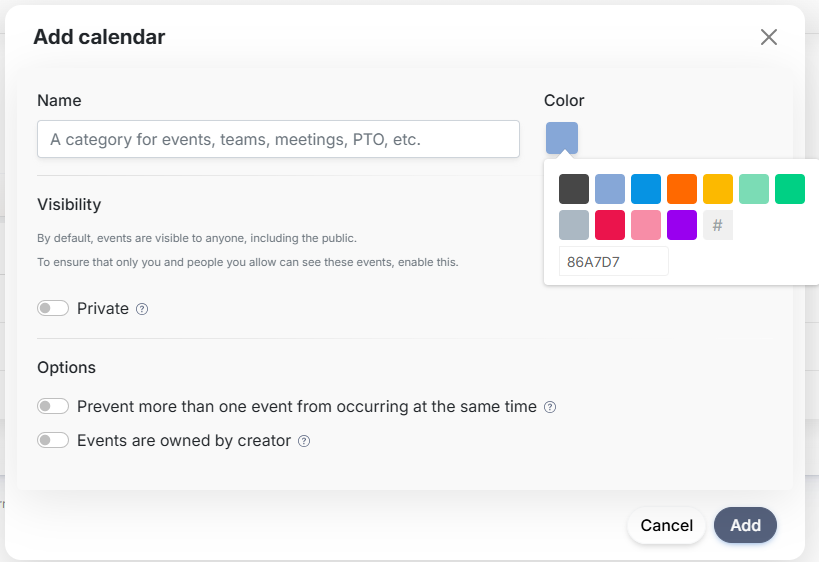
Visibility
You have three viewing options for a calendar.
Public: The default setting is Public. Public events can be viewed by all visitors to your calendar (learn more here)
Private: Viewable only by logged-in users (learn more here)
Selected Private: Viewable only by selected logged-in users. Selecting this option restricts viewing of the calendar's events to a select list of users. This calendar will be hidden from all visitors and users except managers and administrators. (learn more here)
Options
Prevent Double Bookings: Prevent more than one event from occurring at the same time in this calendar (learn more here)
Events are Owned by Creator: A user can add their own events, but not edit another User's events in this calendar (learn more here)
```
Was this article helpful?
That’s Great!
Thank you for your feedback
Sorry! We couldn't be helpful
Thank you for your feedback
Feedback sent
We appreciate your effort and will try to fix the article